REST API Design: Best Practices for Building Clean and Scalable APIs
Meta description: Learn REST API design through practical examples from building Elvoret, including HTTP methods, PUT vs PATCH, status codes, API responses, pagination, authentication, authorization, and common REST API mistakes.
When I first started building backend applications, my main concern was pretty simple:
Does the endpoint work?
If GET /articles returned the articles, I was happy.
If POST /articles created an article, even better.
But as the application grows, you start realizing that an API can work perfectly and still be badly designed.
The URL might be confusing.
The response might be inconsistent.
The wrong HTTP status code might be returned.
Authentication might work, but authorization might be missing.
And then six months later, you have an API that technically works but is annoying to maintain.
While working on Elvoret, I've been thinking much more carefully about this.
So instead of treating REST API design as a list of rules to memorize, I wanted to understand the reasoning behind the decisions.
What is a REST API?
At a basic level, an API is a contract between different parts of an application.
For a web application like Elvoret, we can think about it like this:
Frontend
   |
   | HTTP request
   ↓
REST API
   |
   ↓
Backend
   |
   ↓
Database
Suppose the frontend wants to display articles.
It might send:
GET /api/articles
The backend receives the request, gets the required information from the database, and returns a response, usually as JSON.
The frontend doesn't need to know whether the backend uses MongoDB, PostgreSQL, MySQL, or something else.
It only needs to understand the API.
That separation is one of the most useful things about having an API in the first place.
REST API Design Starts with Resources
One thing I keep seeing beginners do is design URLs around actions.
Something like:
/getAllArticles
/createArticle
/updateArticle
/deleteArticle
There's nothing stopping you from making this work.
I used to think this way too.
But REST encourages us to think about resources instead.
In this case, the resource is an article.
So we can start with:
/articles
Then use HTTP methods to describe what we want to do with that resource.
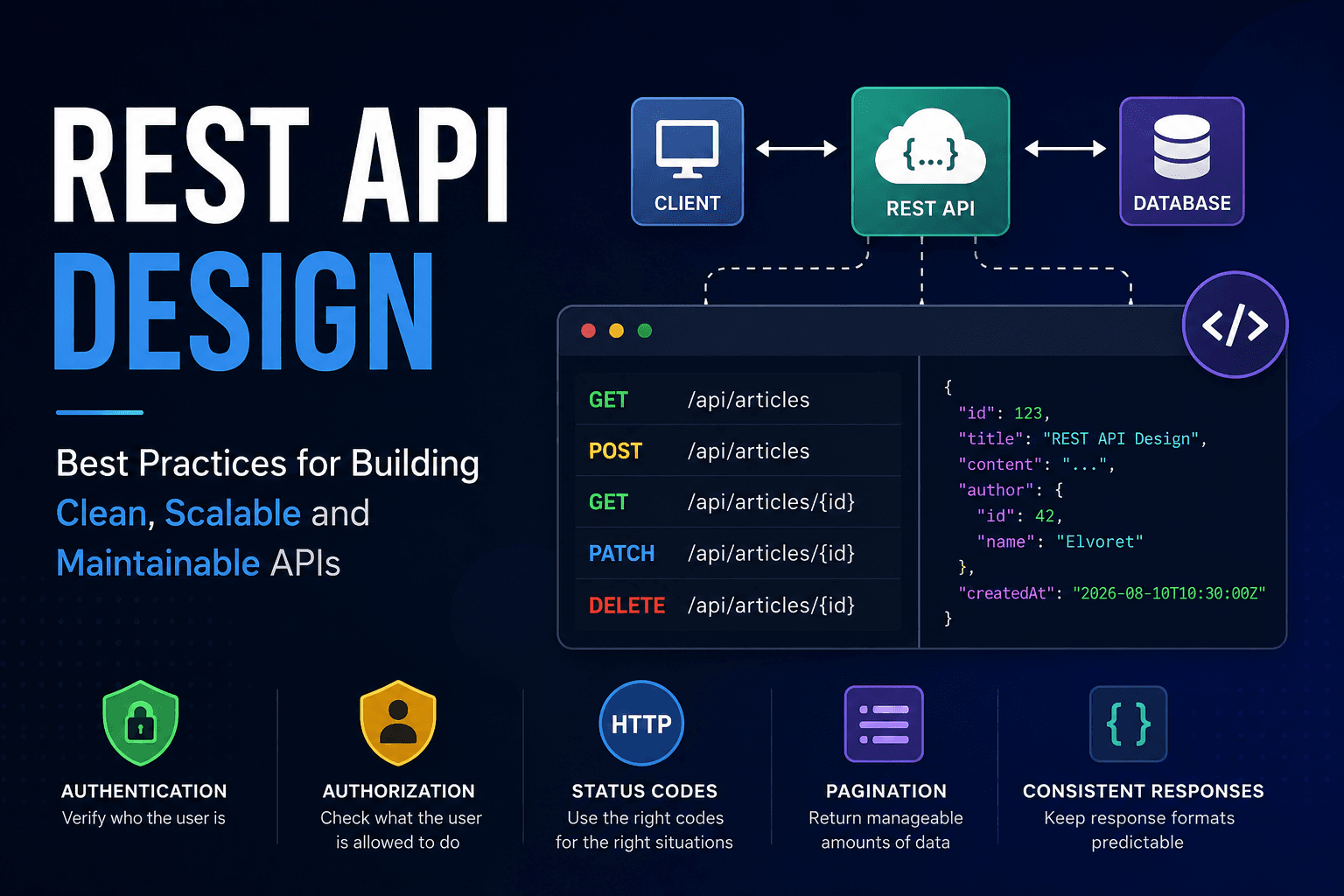
GET    /articles
POST   /articles
GET    /articles/123
PUT    /articles/123
PATCH  /articles/123
DELETE /articles/123
Now the URLs are doing much less work.
/articles tells us we're dealing with articles.
The HTTP method tells us what we're trying to do.
For example:
GET /articles
means:
Give me the articles.
While:
POST /articles
means:
Create a new article.
And:
DELETE /articles/123
means:
Delete article 123.
This sounds like a small difference, but consistent naming becomes increasingly useful as an application grows.
HTTP Methods: GET, POST, PUT, PATCH and DELETE
These are probably the HTTP methods you'll use most often when building a REST API.
GET
Used for retrieving data.
GET /articles
or:
GET /articles/123
The first retrieves a collection.
The second retrieves a specific article.
POST
Generally used to create a new resource.
POST /articles
The request body could contain:
{
  "title": "REST API Design",
  "content": "Understanding APIs..."
}
The backend validates the data, creates the article, and returns an appropriate response.
PUT
PUT is generally used when replacing a resource with a new representation.
For example:
PUT /articles/123
You might send the complete article representation.
This is where things get slightly confusing.
PUT vs PATCH: What's the Difference?
This confused me at first because both are used when modifying resources.
The simplest way I've found to think about it is:
- PUT: replace the resource representation.
- PATCH: make a partial modification.
Suppose our article looks like this:
{
  "id": 123,
  "title": "REST APIs",
  "content": "Learning API design",
  "category": "Backend"
}
Now suppose I only want to change the title.
With PATCH:
PATCH /articles/123
{
  "title": "REST API Design"
}
I'm saying:
Change the title. Leave everything else alone.
That's a pretty natural use of PATCH.
With PUT, the idea is closer to providing the new representation of the resource.
The exact behavior depends on how you implement your API, but understanding this distinction helps avoid treating PUT and PATCH as interchangeable just because both can modify data.
DELETE
Pretty straightforward:
DELETE /articles/123
The server attempts to delete article 123.
If the deletion succeeds and there's nothing useful to return, a 204 No Content response can make sense.
HTTP Status Codes Are Part of Your API
This is another thing that is easy to underestimate.
You could technically return:
200 OK
for almost everything and put the actual result inside your JSON.
But then you're throwing away useful information that HTTP already gives you.
Consider:
GET /articles/9999
and article 9999 doesn't exist.
Returning:
404 Not Found
immediately tells the client what happened.
Some status codes you'll encounter constantly are:
| Status code | Meaning |
|---|---|
200 |
Request succeeded |
201 |
Resource was created |
204 |
Request succeeded with no response body |
400 |
Bad request |
401 |
Authentication required/failed |
403 |
Authenticated but not allowed |
404 |
Resource not found |
409 |
Conflict |
500 |
Unexpected server error |
You don't need to memorize every HTTP status code in existence.
Start with the ones that actually appear in your application.
200 vs 201 vs 204
These three are particularly useful when designing APIs.
If I request an article:
GET /articles/123
and it exists:
200 OK
If I create an article:
POST /articles
and the server successfully creates it:
201 Created
If I delete an article and don't need to return anything:
DELETE /articles/123
a possible response is:
204 No Content
They're all successful responses, but they communicate different things.
That's the point.
401 vs 403: One of the Most Common Mistakes
These two are often mixed up.
They shouldn't be.
Imagine someone tries:
POST /articles
but isn't authenticated.
The server doesn't know who they are.
That's generally:
401 Unauthorized
Now imagine the user is authenticated.
The server knows exactly who they are.
But they try to delete someone else's article.
That's generally:
403 Forbidden
A simple way to remember it:
401: "Who are you?"

403: "I know who you are, but you're not allowed to do that."
That distinction becomes very important once your application has multiple users and permissions.
API Request and Response Design
Getting the endpoint right is only half the job.
You also need to decide what the API actually sends and receives.
Suppose we have:
POST /articles
The frontend might send:
{
  "title": "REST API Design",
  "content": "Understanding APIs..."
}
The backend could respond with:
{
  "id": 123,
  "title": "REST API Design",
  "content": "Understanding APIs...",
  "author": {
    "id": 42,
    "name": "Ansh"
  },
  "createdAt": "2026-08-10T10:30:00Z"
}
The exact structure isn't universal.
What matters is that the frontend knows what to expect.
This is essentially your API contract.
If the response suddenly changes from:
{
  "title": "REST API Design"
}
to:
{
  "article_title": "REST API Design"
}
without the frontend being updated, you've broken that contract.
This is why API design isn't just about URLs.
It's about creating predictable communication between systems.
Path Parameters vs Query Parameters
Here's another distinction that becomes useful almost immediately.
Suppose we want article number 123.
I'd use:
GET /articles/123
The 123 identifies a specific resource.
That's a path parameter.
Now suppose we want to search articles:
GET /articles?search=redis
Or filter them:
GET /articles?category=backend
Or paginate them:
GET /articles?page=2&limit=20
These are query parameters.
A useful mental model is:
Path parameters identify the resource.
Query parameters modify how you want a collection returned.
It's not a law that every API has to follow exactly this way, but it's a very useful convention.
Pagination: Don't Return Everything
Imagine Elvoret eventually has 500,000 articles.
Someone sends:
GET /articles
Are we really going to return all 500,000?
Probably not.
Apart from the huge response, you're making the backend and database do unnecessary work.
A simple pagination approach could be:
GET /articles?page=1&limit=20
Then:
GET /articles?page=2&limit=20
The response might contain:
{
  "data": [
    {
      "id": 1,
      "title": "..."
    },
    {
      "id": 2,
      "title": "..."
    }
  ],
  "pagination": {
    "page": 1,
    "limit": 20,
    "total": 500000
  }
}
For a relatively small application, this is perfectly reasonable.
As the dataset and traffic become much larger, you may start looking at cursor-based pagination.
That's another example of why system design is mostly about trade-offs.
You don't necessarily need the most complicated solution on day one.
You need a solution appropriate for the problem you actually have, while leaving yourself room to grow.
Consistent API Error Handling
Another thing that gets messy surprisingly quickly is error responses.
Imagine one endpoint returns:
{
  "error": "Article not found"
}
Another returns:
{
  "message": "User doesn't exist"
}
And another:
{
  "failed": true
}
Technically, all three can work.
But the frontend now needs to know three different formats.
I'd rather establish a consistent structure.
For example:
{
  "error": {
    "code": "ARTICLE_NOT_FOUND",
    "message": "The requested article does not exist."
  }
}
Now the frontend has something predictable to work with.
You can also have different error codes for different situations:
ARTICLE_NOT_FOUND
INVALID_ARTICLE_DATA
UNAUTHORIZED
FORBIDDEN
USER_NOT_FOUND
The important part isn't the exact naming convention.
It's consistency.
Authentication and Authorization Are Different
This is one of the most important concepts when building APIs with users.
Suppose we have:
PATCH /articles/123
The backend needs to answer two questions.
Who is making the request?
That's authentication.
Are they allowed to modify article 123?
That's authorization.
These are not the same thing.
Suppose User A owns Article 123.
User B is logged in and sends:
DELETE /articles/123
Authentication succeeds.
We know User B is a legitimate logged-in user.
But authorization fails.
User B doesn't own Article 123.
So the backend should reject the operation.
Never Trust the Frontend for Authorization
This is one principle I want to keep in mind while building Elvoret.
Suppose the frontend doesn't show the "Delete" button to users who aren't allowed to delete an article.
That's good.
But it isn't security.
Someone can still manually send:
DELETE /articles/123
directly to the API.
The backend must perform the authorization check itself.
Conceptually:
Request
   ↓
Is the user authenticated?
   ↓
No → 401
   ↓
Yes
   ↓
Does the user have permission?
   ↓
No → 403
   ↓
Yes
   ↓
Perform operation
The frontend controls the user experience.
The backend controls access to the resource.
That distinction is easy to miss when you're primarily working on the frontend.
What About JWT?
JWT comes up almost immediately when you start learning API authentication.
A simplified flow looks like:
User logs in
      ↓
Server verifies credentials
      ↓
Token issued
      ↓
Client sends token with requests
      ↓
Server verifies token
      ↓
User identified
The request might contain:
Authorization: Bearer <token>
But one thing is worth clearing up:
JWT is not synonymous with authentication.
JWT is a token format that can be used as part of an authentication system.
There are other approaches, including server-side sessions.
So when someone says:
"JWT is authentication."
that's not really the complete picture.
A Practical REST API for Elvoret
Putting everything together, a basic article API could look something like this:
GET     /api/articles
POST    /api/articles
GET     /api/articles/:id
PATCH   /api/articles/:id
DELETE  /api/articles/:id
Then we can add query parameters:
GET /api/articles?page=2&limit=20
GET /api/articles?category=backend
GET /api/articles?search=redis
And the server can use appropriate status codes:
200 → article retrieved
201 → article created
204 → article deleted
400 → invalid request
401 → authentication problem
403 → insufficient permission
404 → article doesn't exist
500 → unexpected server problem
Now we have something that isn't just functional.
We have an API that another developer can look at and understand without opening the backend code first.
That's a useful test for API design.
Common REST API Design Mistakes
There are a few mistakes I'd specifically watch for.
-
Designing URLs around actions
/createArticle
/getArticle
/deleteArticle
Instead, think in terms of resources:
/articles /articles/:id -
Using
200 OKfor everythingStatus codes exist for a reason.
Use them to communicate the outcome.
-
Confusing authentication and authorization
A logged-in user isn't automatically allowed to modify every resource.
-
Trusting frontend permissions
Hiding a button is not authorization.
-
Returning inconsistent response structures
Your frontend shouldn't need a different error-handling strategy for every endpoint.
-
Returning huge datasets
Pagination isn't something you should think about only after your API becomes slow.
-
Adding complexity too early
This one is probably the easiest to forget.
It's tempting to design everything as if you're already serving 100 million users.
You probably aren't.
A small application doesn't need a distributed architecture just because a diagram on the internet looked impressive.
Design for the problem you have, while leaving yourself room to grow.
What I'm Taking Away from This
The more I work through REST API design, the less I think it's about memorizing things like:
GET means this. POST means that. 404 means this.
Those are useful, but they're not the interesting part.
The interesting part is why we're making these decisions.
Why should /articles/123 identify a resource instead of /getArticle?id=123?
Why should a missing article return 404?
Why shouldn't the frontend be responsible for authorization?
Why shouldn't an API return every article in the database?
Why should responses have a predictable structure?
Once you start asking those questions, API design becomes much less about following a checklist and more about designing a system that other pieces of software can reliably communicate with.
That's the direction I'm trying to take Elvoret in.
Not just making endpoints that work.
Making endpoints that still make sense when the project gets bigger.